1. Introduction
Faceted search offers tremendous potential for transforming the search experience. It provides a flexible framework by which users can satisfy a wide variety of information needs, ranging from simple fact retrieval to complex exploratory search and discovery-oriented problem solving. But how do we extend such a framework to accommodate not just dozens of facet values, but thousands, or even tens of thousands? It is clearly not practical to display such lists in their entirety. So how can we provide adequate flexibility yet ensure that the user is not overwhelmed in these situations? In this post, we’ll examine the main approaches. In so doing I’d like to acknowledge the work of James Kalbach, whose previous posts on the subject may be the first attempt to document the topic in a comprehensive manner.
2. Display formats and scalability
In previous posts we reviewed a number of display formats for facets and whether their default state should be open or closed by default. A key principle to emerge from that discussion is that it is important for facets to offer an appropriate information scent, i.e. revealing their content and providing navigational cues to help users to formulate productive search strategies. In practice, this means that facets should ideally be open by default, and display a representative sample of facet values. Of course, exactly what constitutes ‘representative’ can be defined in many ways, but in effect this usually entails ordering the list of values by frequency (or some other measure of popularity) and then displaying the first half dozen or so. This raises the question: if the user does want to see the full list of values, how do we extend the display to accommodate them?
There are three main solutions to this problem:
- Avoid it entirely by displaying the complete list of facet values by default (although this approach is not always applicable for reasons we’ll discuss below)
- Use an expandable container that extends on demand to accommodate additional values.
- Use a secondary container to display the longer list, with an associated transition to communicate the relationship between the two.
Let’s examine each approach in turn.
3. Display all values by default
The simplest approach to the problem of showing more values is to avoid it completely by displaying the complete list of facet values by default. This is possible if a display format is used that can scale to accommodate lists of arbitrary length, such as a scrollable container. However, it also assumes that the lists of values are bounded in some way to a manageable size. Scroll bars may be infinitely scalable in principle, but in practice few users would wish to deal with lists of more than hundred items or so (and in many cases significantly fewer).
An example of displaying all items by default can be found at Carzone, which by default displays facets in a vertical stack configuration using scrollable containers for lists of greater than a dozen or so (such as Makes & Models in the example below):
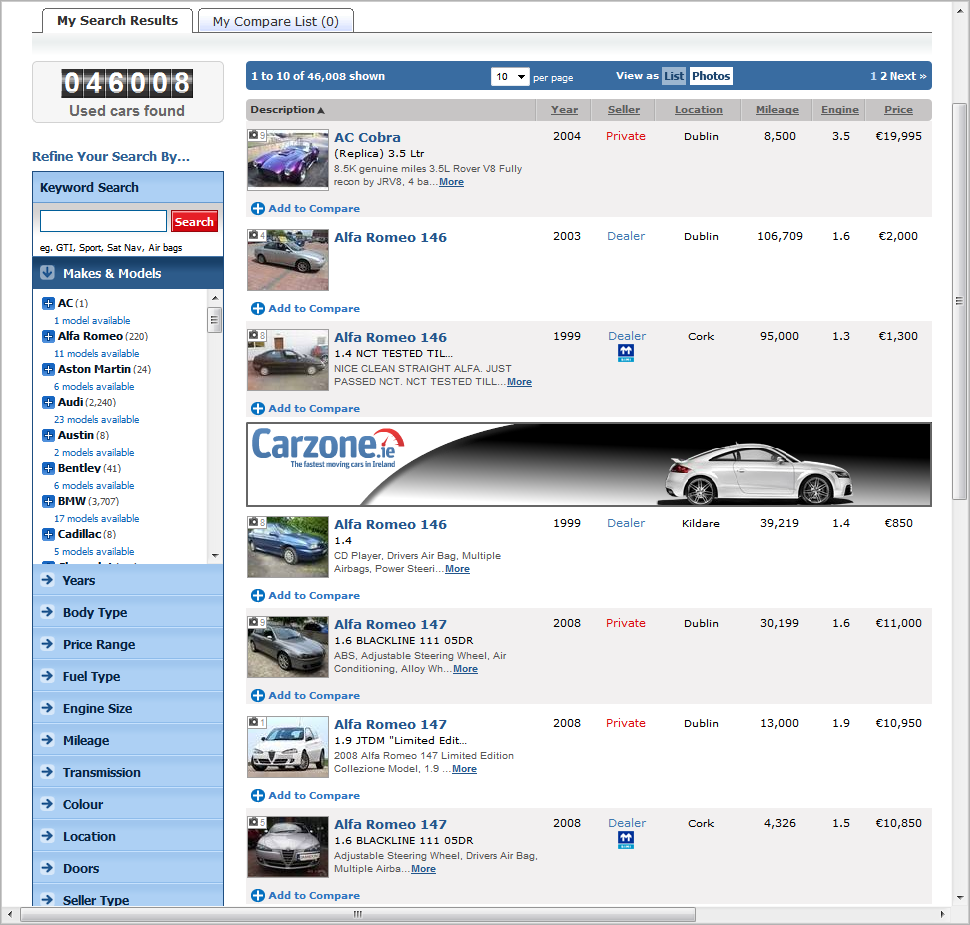
Carzone displays all facet values by default
A variation on this approach can be seen at Farnell, which displays facets in the open parametric configuration. This arrangement applies the principle along both axes: the facets themselves are displayed within a horizontal scrollable panel (extending off the screen to the right) and the values within each of the facets are displayed within vertically scrollable containers. All of the scroll bars appear as required (so they are suppressed for facets with fewer than a handful of values):

Farnell displays all facet values by default
4. Expandable Containers
For many applications, however, displaying all facet values by default is not a scalable solution. Instead, a ‘by request’ approach is required. Perhaps the simplest of these approaches is to present an option to expand the facet inline, i.e. extend its dimensions to accommodate a larger set of values. An example of this approach can be found at NCSU libraries, which displays the top 5 values by default, but expands this vertically to accommodate the top 30 when the ‘Show More’ link is selected (as illustrated by the Subject facet in the image below):

NCSU Libraries expands facet values on demand
This approach is conceptually simple; few users would find the transition between states confusing or intrusive. However, one flaw in this particular execution is that there is no option to show fewer values once a facet is expanded, except by closing it completely. Consequently, once two or more facets have been expanded, it is very difficult to review the contents of the remaining facets without repeated scrolling.
A variation on this approach can be seen at Hoovers, whose option to see more values results in a vertical scroll bar appearing within each facet (as illustrated by the Location and Employees facets):

Hoover expands facet values on demand
Again, the approach is conceptually simple, with a straightforward transition between states.
5. Secondary Containers
While the first two approaches display both the collapsed and expanded set of facet values within the same container, a third approach is to display the expanded set in a new container, and communicate the relationship between the two using visual design cues and/or an appropriate transition.
Perhaps the most lightweight variation on this approach is to use a detail overlay to display the full set of facet values adjacent to the original set. Artist Rising’s ‘More Choices’ link, for example, displays the remaining facet values as a secondary list, extending the original set in a contiguous manner. One advantage of this approach is that the sort order is preserved, e.g. in the example below the complete list of Subjects is still presented in descending order of record count:

Artist Rising displays facet values in a secondary list
A variation on this approach can be seen at Food Network, which shows three values by default but presents an option to show more of any facet on request. This approach uses an overlay as before, but instead of displaying just the additional values it displays the entire list:

Food Network displays facet values in a secondary list
This has the advantage the list can now be displayed in alphabetical order (to facilitate visual scanning). Note that in this display the record counts are suppressed, possibly to reduce any confusion that may arise by displaying such counts in an apparently unsorted order (or perhaps just to reduce clutter and allow the alphabetic ordering to be more apparent).
The transition from one sort order to another may introduce something of a cognitive disconnect for some users, although this is mitigated somewhat by the minimal size of the collapsed list. Note also that the contents of the overlay in this case are limited to a maximum of 50 values, presumably to mitigate the overhead of scrolling an extended list.
A somewhat heavier approach is to use a modal overlay to display the full set of facet values. An example of this can be seen at eBay, which uses the overlay to present the complete list of values for each facet in its own pane. This design allows only one facet to be visible at any one time (in keeping with the principles we discussed in the previous post on Interaction Models for Faceted Search). In common with Food Network, this approach limits the display of expanded facets to the top 50 or so:

eBay displays facet values using a modal overlay
Both of the above approaches support the principle of minimising the disruption to the user’s mental flow by staying on the page. A more heavyweight approach is to present the list of values on their own page, which is the approach adopted by Amazon on certain sections of their site (e.g. footwear). The example below shows the use of multi-select facets displayed using checkboxes in a vertical stack configuration, with options to ‘See more’ for both Brand and Seller:

Amazon displays multi-select facets using checkboxes
However, selecting the ‘See more’ option (e.g. for Brand) loads a new page displaying the entire set values for that facet:

Amazon loads a new page to display facet values
Surprisingly, this page presents the options as hyperlinks (rather than checkboxes), which as we have seen in a previous post are better suited to single select facets. Indeed, that is exactly how they behave: selecting one value immediately returns the user to the original results page with that facet value now applied. Interestingly, it seems the list of values attempts to be exhaustive, which can produce some extremely long pages (e.g. such as the list of authors for the entire Books section).
6. Hybrid Approaches: search within facets
In the sections above we discussed the primary approaches to showing more values, such as extending the existing container or displaying a new one. What these approaches have in common is that they allow the user to browse a longer list of values to make further selections. However, an alternative approach exists, which allows the user to search for specific values rather than browse. An example of this can be seen at LinkedIn, which by default displays multi-select facets using checkboxes in a vertical stack configuration:

LinkedIn allows search within facet values
As expected, each of these facets shows the first half dozen or so values by default (ordered by record count), with an option to “Show more…” that extends the list to include the first dozen or so. But what makes this design different is the use of the text field (shown below the Current Company and Location facets). As soon as the user starts to type into this box, an autocomplete dialog appears with up to ten suggested values. In this respect, this design offers a more complete experience than the others above, since it allows the user to either search or browse to select further facet values.
7. Conclusions
Over the last few weeks we’ve looked at some of fundamental design issues in faceted search, such as layout (e.g. where to place the faceted navigation menus) and state (e.g. whether they should be open or closed by default) and display formats. In this article, we’ve complemented that with a review of the various techniques for managing long lists of facet values. This means that the complete list of articles on faceted search design now covers the following topics:
- Designing Faceted Search – (part 1: layout & state)
- Designing Faceted Search – (part 2: fundamental principles + display formats)
- Designing Faceted Search – (part 3: showing more values)
- Interaction Models for Faceted Search
- Wayfinding and Navigation in Faceted Search
With a subject as rich and complex as faceted search, no review can ever be complete, and there is always more to learn, explore, and debate. And we’re aware that this collection of articles still lacks a comprehensive discussion of the issues surrounding the use of record counts and smart dead ends. But we’d like to think that this article marks the final section for a forthcoming book chapter on designing faceted search.
Of course, if you think we’ve missed any topics or would like to suggest others, then we’d love to hear. Feel free to drop me a line either here or via email at tgr AT uxlabs.co.uk.



 Information Interaction
How about addressing the problems that hierarchies present in faceted navigation. My approach is simple:
1. Use simple single selection for category—this works OK because categories are for the ‘big’ decisions.
2. Use multiple selection for up-to-2-level and ‘synthetic’ hierarchies—I don’t know the proper term for the latter, but by ‘synthetic’ I mean those hierarchies that could be arranged in many correct ways, unlike an Aristotelian taxonomy.
I’ve seen some pretty weird approaches, too, like Buy.com’s:
http://www.buy.com/SR/SearchResults.aspx?loc=20269&sid=33&tcid=2547&qu=leapfrog#loc=20269&qu=leapfrog&from=7&sid=33&tcid=2548&tcid=2599&tcid=2679&tcid=2738&page=1
I can’t say I love this. Department vs. Category? 4 levels of a tree with multiple selection and implied deselection by clicking a parent? 2 ways to control price in different locations? Age Range & Age Segment?
No instant feedback when you click the checkbox? Instant if you click the link?
It also looks like they don’t actually implement multiple selection except prior to applying filters. Nor would what they do prevent dead-ends if you select across facets.
Jaimie: wow, never seen that before: there are indeed some talking points here. That hierarchical selector is quite ‘unique’, let’s say. I can imagine some domains where users would be incentivised to use learn and use such a complex control, but eCommerce doesn’t seem one of them.
And yes, every point you make about facet labelling, choice, etc, are all very valid. Re the last point, I have real difficulty figuring out what happens when you apply multiple values across facets (so god knows what your average shopper in a hurry thinks). They’re using a 2-step interaction model, which can always lead to dead ends (https://isquared.wordpress.com/2011/04/12/interaction-models-for-faceted-search/), but somehow it always seems to return results. Almost like it defaults to OR across facets if AND doesn’t work (which would be really bizarre).
‘Unique’ is right. I can see that control for an analytics tool. I think we actually found 5 levels in one section of the tree!
We’ve done 2-step, but when we do we only allow it within 1 facet at a time to solve the dead-end problem. I guess that only works with disjunctive selection, actually—and I never thought about that. Fortunately that’s what you’re usually doing anyway.
Buy.com is not only 2-step. It’s 2-step without calculating what you can select within the same facet. Once you select, you have to clear and retry. I don’t get that. That’s confusing as well.
It looks like multiple-selection was an afterthought. Computationally multiple-selection is much slower, so maybe they can’t do it?
Very interesting post indeed Tony. I have read all three parts and am impressed with the depth of your analysis. Just subscribed to your RSS feed as rarely have I encountered such detailed and well-researched posts on UX.
Hi, really interesting subject. We’ve spent many years refining (!) our faceted search UX, would be interested in your feedback: http://www.motors.co.uk
This is awesome! Ill be checking out the full list of faceted search design article next. Thanks for sharing
Very good article. I really enjoyed it.
First, thanks for the great articles and the website. What sort of thoughts do you have on allowing users to select facets from very large or deep taxonomies, SNOWMED for example? Struggling right now finding or creating design patterns that allow users to see their deeply nested selections and simultaneously navigate the taxonomy. I may end up showing only top results and creating an auto-suggest ala the people search facets on LinkedIn. Any examples or suggestions?
Thanks JD, glad to hear it. Great question – I don’t think I’ve ever seen a really satisfactory solution for this. I’ve seen plenty of peple try tho – what usually happens is they start with a tree widget, and then try to use the ‘expand collapse’ control to also indicate state (e.g. all children selected/unseledted). Trouble is, this sort of overloading always leads to problems and inconsistent states.
I think McMaster Uni library used to have a large ‘subject browser’ widget which used to span the whole page, and allow navigation up & down the hierarchy (using one level of expansion at a time). But I can’t see it there now.
Your sugestion of using a LinkedIn style lookahead (or autocomplete) sounds good. But of course that’s not going to scale well to multi-select, which is I guess pretty important when browsing something the size of SNOMED. If you do go down the route of wanting to support full access (i.e. simultaneous navigation and selection), I’d be inclined to separate it out from the other facets (as McMaster did), and play it in its own pane with an associated buffer for accumulating the breadcrumbs, etc. I expect you’ll need 2 separate controls (or something pretty flexible) for both opening/closing branches AND indicating the state of that node (and its children).
FWIW I’m not keen on the idea of “rolling up” fine grained values into aggregate ones, which is another approach I’ve come across.
@jdvogt
My experience [which is less formal than Tony’s, but has seen lots of interfaces attempt these things] tells me that this is virtually impossible. However, here are the direct approaches I’ve seen in a nutshell:
1. Only have 1 hierarchical facet (category) in single select and use multiple or single-selection for everything else that isn’t hierarchical. This is what the vast majority of eCommerce does.
2. Only have 1 hierarchical facet (category) and do multiple-selection with it with 1 caveat. Use single or multiple selection for everything else that isn’t hierarchical. Caveat: If siblings are selected for category, pretend there are no children. This prevents split-ends, but also unfortunately prevents exploration without any indication that this is occurring.
3. Limit hierarchy to 2 levels for anything in multiple-selection. This works surprisingly well when you can actually do it. It works better for ‘fake’ hierarchies (i.e. 2 levels of price or breaking up A-Z into 4 ‘chunks’) than real taxonomies. I do this all the time.
4. Confuse everyone and do what Buy.com did with a tree control, but all that confusing, and it’s still only 1 hierarchy. I’m suspecting you might be dealing with hierarchIES.
So the problems get more difficult with multiple selection. And the problems also get more difficult if you’re selecting from hierarchIES, not 1 hierarchy for various reasons.
So the first questions are, do you want multiple selection, and do you need selection from multiple hierarchies? If so, I don’t think I’ve ever seen a perfect approach for either of these things — even individually.
Good controls would help, but it will still be a challenge to use, which is why it’s generally avoided for general consumption in eCommerce. The problem is, even if you only have 1 hierarchy — you’re going to be possibly searching for nodes in very distant parts and levels of the tree. I don’t think there is a solution for this at all. For example “wars in vietnam” might be under a very different part of the hierarchy than “art in vietnam.”
The simplest approach that I could see working well for reasonably adept users is just plain flattening the tree, i.e.
[ SEARCH HERE ]
[ ] A
[ ] A > B
[x] A > B > C
[x] Z
[ ] Z > Y > X,
[x] Activities > Useless > Water > Basket Weaving
enabling multi-select, and just throwing a search box up top, either substring or index+AJAX based (depending on size). This is a bit of a copout, but if you deconstruct the hierarchy, lots of things start working again. You can even scroll/transparently page it with an AJAX based scroll pane control if the number of values is enormous. Put it in some obvious tree traversal order. You could even make boolean or IDF-ranked queries work in [ SEARCH HERE ] so you can get all category-paths that relate to +water +basket +weaving.
The split ends vanish, and you can convey gray ends. A lot of things begin to work, including multiple hierarchies (if you can call it that). I’ve wondered about this, because I believe Ranganathan, the father of faceted search had 5 hierarchies of classification (PMEST). 1 hierarchy with multiple selection is bad enough. But add multiple hierarchies and I have no idea how it works.
So I might just deconstruct and make the values (as their complete paths) searchable. That will scale well for large hierarchies and enable multi-select, which is more and more expected esp. if your data are not perfect.
Yes, it’s not behaving like a hierarchy anymore, but on the flipside, I’ve never seen a deep hierarchy actually work, either. Deep hierarchies are often, in my experience, a result of conflating multiple facets into 1. That usually doesn’t go so well, either.
Tony, thoughts?
Hi Jaimie – yep, makes sense. I agree that flattening the hierarchy solves a lot of problems in principle … but in practice I’m not sure how this would scale for something like SNOMED (which has 300,000+ terms, as I recall). Having a ‘search here’ could get round that to provide random access – but were you envisaging coupling that with some sort of multi-select capability too?
Well, I think it _could_ scale to multi select. I’ve seen Amazon (Endless.com) simply list the selected values under the scrolling control. I’ve seen others bubble them to the top (but I don’t like this as much). You could also have 2 checkboxes above the box that say [x] selected values [x] unselected values to make the selected values findable/verifiable. There are a few other variations that I’ve used as well that I could show you, but they’re mostly optimized for single selection or sets that will often correlate with other sets.
Ultimately this interface is for an expert, not a layman shopping for a digital camera, so a little bit of awkwardness is acceptable. If it’s 300K values, a tree just doesn’t scale. This is the only thing I can think of that could possibly work.
Ranganathan probably wasn’t thinking of this — and there are lots of UX and computational problems if you try to do multiple hierarchies with single selection, even. Sometimes copouts are the way to go.